United Cerebral Palsy of Huntsville & Tennessee Valley, Inc. | 1856 Keats Drive NW | Huntsville | AL | 35810
|
Pages
The Southern California Augmentative and Alternative Communication Network...
...is a support group for professional development, problem solving, leadership, mentoring, and training in the use of augmentative and alternative communication (AAC) to develop communication in non-speaking and minimally verbal individuals in the Southern California Region.
Follow this blog via email at the right.
Join our email list: socalaacnetwork@gmail.com
Friend us on Facebook SoCal AAC
Follow us on Twitter @SCAACN
Thursday, November 15, 2012
Thanksgiving AT Tools - from Star Training
Wednesday, November 14, 2012
Autism Speaks AT Series: FREE Webinar December 6!
Thursday, December 6th 4:00 Pacific (7PM EST)
Jennifer Leighton, M.A., CCC-SLP
From Pictures to Technology: Creating an Environment for Language Learning, Communication, and Independence
Join
us for a webinar hosted by Jennifer Leighton, M.A., CCC-SLP to learn
how to create an environment for language learning, communication, and
independence.
Register today!
Jennifer joined the Cotting Consulting team at the Cotting School, in Lexington, Massachusetts, in May 2012. As part of this program Jennifer goes out to schools to teach strategies and best practices for technology integration and implementation, increasing staff comfort with higher-tech options. She provides staff education and therapeutic interventions.
Archived Webinars on AT in ASD from Autism Speaks:
How to Use Technology to Enhance Learning for People with ASD
Mark Mautone, Special Education Teacher

On October 2nd, Mark Mautone's webinar covered the ways technology is being used to improve the life of people with autism spectrum disorder.
Mark has extensive knowledge in assistive technology that includes adapting curriculum, creating individualized technological curriculum using iWorks and iLife, and effectively harnessing standard curriculum with iPad/iPod Touch applications to create a seamless learning experience.
Didn't get a chance to see it? You can watch Mark's Webinar here!(you'll be asked for your email address. Mac users may need to install a player)
Click here to see the webinar overview.
Click here to see the webinar slides.
Augmentative Alternative Communication (AAC), Evaluation and Treatment
Kate Grandbois, MS, CCC-SLP
On November 14, Kate Grandbois, MS, CCC-SLP, covered the different technologies that can help people with autism and how to
request a Technology Assessment.
Kate is a certified and licensed speech and language pathologist who serves children and adults with developmental disabilities. Kate specializes in augmentative and alternative communication (AAC), autism and related neurological disorders, speech and language disorders, and social skills development.
Didn't get a chance to see it? You can watch Kate's Webinar here! (you'll be asked for your email address. Mac users may need to install a player)
Click here to see the webinar slides.
Click here to see a list of key words for AAC Evaluations.
Jennifer Leighton, M.A., CCC-SLP
From Pictures to Technology: Creating an Environment for Language Learning, Communication, and Independence
Join
us for a webinar hosted by Jennifer Leighton, M.A., CCC-SLP to learn
how to create an environment for language learning, communication, and
independence.Register today!
Jennifer joined the Cotting Consulting team at the Cotting School, in Lexington, Massachusetts, in May 2012. As part of this program Jennifer goes out to schools to teach strategies and best practices for technology integration and implementation, increasing staff comfort with higher-tech options. She provides staff education and therapeutic interventions.
Archived Webinars on AT in ASD from Autism Speaks:
How to Use Technology to Enhance Learning for People with ASD
Mark Mautone, Special Education Teacher

On October 2nd, Mark Mautone's webinar covered the ways technology is being used to improve the life of people with autism spectrum disorder.
Mark has extensive knowledge in assistive technology that includes adapting curriculum, creating individualized technological curriculum using iWorks and iLife, and effectively harnessing standard curriculum with iPad/iPod Touch applications to create a seamless learning experience.
Didn't get a chance to see it? You can watch Mark's Webinar here!(you'll be asked for your email address. Mac users may need to install a player)
Click here to see the webinar overview.
Click here to see the webinar slides.
Augmentative Alternative Communication (AAC), Evaluation and Treatment
Kate Grandbois, MS, CCC-SLP
On November 14, Kate Grandbois, MS, CCC-SLP, covered the different technologies that can help people with autism and how to
request a Technology Assessment.Kate is a certified and licensed speech and language pathologist who serves children and adults with developmental disabilities. Kate specializes in augmentative and alternative communication (AAC), autism and related neurological disorders, speech and language disorders, and social skills development.
Didn't get a chance to see it? You can watch Kate's Webinar here! (you'll be asked for your email address. Mac users may need to install a player)
Click here to see the webinar slides.
Click here to see a list of key words for AAC Evaluations.
Tuesday, November 13, 2012
PRC Consultant Corner
![]()
|
|||||||||||||||||||||||||||||||||||
Monday, November 12, 2012
Re-Post: Force Quit an App in iOS
Re-Posted from OSXDaily (Click HERE to link to the original)

iOS is generally very stable but every once in a while you’ll encounter a third party app that isn’t. Apps can freeze or become stuck, you’ll usually know instantly because the iPad or iPhone becomes unresponsive to touch behavior or something within the app is clearly running amuck. When this happens the best thing to do is to force quit the app.
iPhone and iPad apps should rarely freeze, if you continuously encounter stability issues you may want to backup and then reset to factory defaults or restore to try and resolve the problems.

iOS is generally very stable but every once in a while you’ll encounter a third party app that isn’t. Apps can freeze or become stuck, you’ll usually know instantly because the iPad or iPhone becomes unresponsive to touch behavior or something within the app is clearly running amuck. When this happens the best thing to do is to force quit the app.
Force Quit an App in iOS
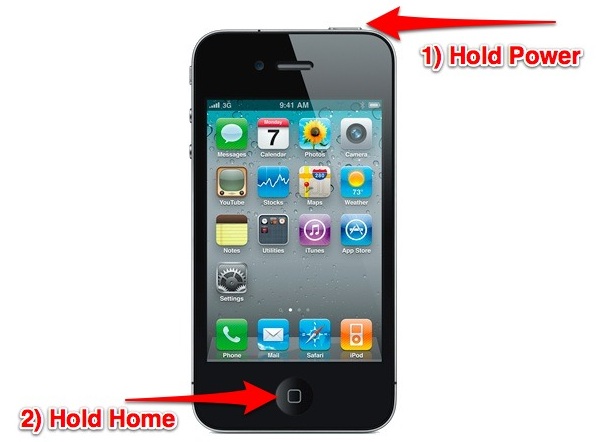
This will be the same on iPhone, iPad, and iPod touch:- Hold down the Power button at the top of the device until the “Slide to Power Off” message appears and then release the power button
- Now hold the Home button at the base of the screen until the app forcibly quits, this can take several seconds
iPhone and iPad apps should rarely freeze, if you continuously encounter stability issues you may want to backup and then reset to factory defaults or restore to try and resolve the problems.
QR Codes - An Introduction
They've been popping up for years, and I've been wondering why to care about QR Codes, aka. Quick Response Codes. This two-dimensional
bar code was originally created by a Japanese company (of course) in 1994 for use in the Automotive industry for tracking
parts and high-speed data decoding. In recent years, QR codes
have made their way into the education field's broad and sometimes overwhelming category of emerging technologies, and while this post does not directly relate to AAC, I think these little guys are worth knowing about.
QR codes consist of black squares of varying sizes arranged on a
white background and in our modern advertising world are intended to be scanned into your mobile device from a billboard, bus ad, poster or magazine page in order to get more information, a special coupon, etc. With an app such as Scan by QR Code City
on your mobile device and WiFi service, you aim, your device locks onto
and scans the QR code frame, and then (most often) takes you to a web site.
A QR code can store all kinds of information. Here are some common uses:
- Text
- Web Addresses / URLs
- Phone Numbers
- Numeric Code, Part Numbers: Up to 7,089 Characters
- Alphanumeric: Up to 4,296 Characters
- GPS Data / Coordinates
- Contact Information / Business Card Info / Vcard Data
- Wi-Fi Network Info
- A word with a target sound
- A vocab word or definition
- Contextual info
- Or a strategy you want the student to use
From Sweeney: QR codes lend themselves to be used in scavenger hunts
in which a child locates the codes you have hidden around the classroom,
therapy center, or wherever. They also lend themselves to story
mapping, as a story can be broken down into text elements and printed as
QR codes, one for character/setting, one for kickoff, and so on.(CLICK HERE to go to an example of Sweeney's story grammar marker QR codes)
Here is a QR code I created on a free website called Kaywa. Open your QR scanner app, point, scan, and your device will procede to a URL for my post of the 46 ASHA Convention 2012 sessions on AAC (poster sessions excluded).
A little more about QR codes from Sean Sweeney is available on the ASHAsphere (ASHA's official blog)... So what about QR codes is applicable to us as SLPs and educators? First of all, they are extremely easy to
create and print for use in sessions (though again, you need to have
access to [a mobile device], or a computer with a
webcam in order to read them). Secondly, they are an instant attention-grabber for kids, and
constitute a kind of high-tech hide and seek. Rather than giving kids a
piece of paper that serves as a stimulus (word or picture), you can
present (or hide!) a QR Code they can scan in order to read a text
message or see an image, website or video. Students from Kindergarten to
High School are engaged by this little hook, which adds the process of
discovery to any of your sessions.
From Patrick
Black via Teaching All Students blog (scan the code I created for this URL, at left, and read the blog on your device): QR
Codes are everywhere, and I've started using them in my classroom.
One use I have been trying, is attaching them to homework for students.
Typically I'll print them out on an address label and the code will
link to a screencast or video explanation of the homework activity... great way to share information with parents, and help
students remember what they need to do on worksheets. Nothing special
but an easy way to incorporate multiple representations in an activity.
Read Sean Sweeney's Part 2 on creating your own QR codes, posted on ASHAsphere. He describes in detail how to create
various kinds of QR codes, apps to use to scan them, and lesson ideas
for you to try out right away!
Friday, November 9, 2012
Online CEUs - Rett Syndrome (T. Bartolotta)
SpeechPathology.com offers unlimited online CEUs for a one-year subscription of $99! This course on Rett's looks right up our alley...
Rett Syndrome: Communication Assessment and Intervention – Part II
Thu, Nov 29, 2012 at 9:00 am PST
Rett Syndrome: Communication Assessment and Intervention – Part II
Thu, Nov 29, 2012 at 9:00 am PST
CEUs/Hours Offered: ASHA/0.1 Intermediate, Professional; CASLPA/1.0
Live Webinar Course: #5600 · Duration: 1 hour
Cost: Included in $99 unlimited CEU package
Learn More
This course is the second of a two-part series that will provide a
comprehensive introduction to Rett syndrome for the practicing
clinician. This course will review the best evidence on assessment and
treatment of communication skills in individuals with Rett syndrome and
provide practical strategies for design and implementation of
intervention programs with this complex population. The use of
augmentative and alternative communication strategies, from low-tech
options to electronic eyetracking systems, will be discussed. The course
will include description and demonstration of a communication coaching
model that can be implemented in schools and in the home with a variety
of communication partners.

Theresa Bartolotta, Ph.D., CCC-SLP
Theresa E. Bartolotta earned her Master’s degree in
Speech-Language Pathology from Queens College of the City University of
New York and her Ph.D. from Seton Hall University. She is Associate
Professor of Speech-Language Pathology and Director of Assessment in the
Office of the Provost at Seton Hall. Her primary research interests are
in communication impairment in autism spectrum disorders, including
Rett syndrome. She has published articles and presented widely on Rett
syndrome and communication intervention in this population.Saturday, November 3, 2012
iPad Dog Commands - TouchChat
Another great story, referred by Terry Kappe, SLP!
The folks at TouchChat have put their app to work for a young girl with autism and two trusty dogs. Personalized with pics/words, this TouchChat vocabulary can be used to allow the child to give these pups commands using her iPad.
Ricochet and Rina have been learning how to take voice cues from the synthesized voice (Laura) from an electronic device. Watch a training session video HERE. Technology creates learning curves for all beings (not just the human kind). Alternatively, the programmer could have also used the Button Action called "Play Audio" so that the app can play digitized speech of an actual person delivering the verbal command with proper inflection.
Please LIKE TouchChat's Facebook page!
The folks at TouchChat have put their app to work for a young girl with autism and two trusty dogs. Personalized with pics/words, this TouchChat vocabulary can be used to allow the child to give these pups commands using her iPad.
Ricochet and Rina have been learning how to take voice cues from the synthesized voice (Laura) from an electronic device. Watch a training session video HERE. Technology creates learning curves for all beings (not just the human kind). Alternatively, the programmer could have also used the Button Action called "Play Audio" so that the app can play digitized speech of an actual person delivering the verbal command with proper inflection.
Please LIKE TouchChat's Facebook page!
Subscribe to:
Posts (Atom)