The Southern California Augmentative and Alternative Communication Network...

...is a support group for professional development, problem solving, leadership, mentoring, and training in the use of augmentative and alternative communication (AAC) to develop communication in non-speaking and minimally verbal individuals in the Southern California Region.

Follow this blog via email at the right.
Join our email list: socalaacnetwork@gmail.com
Friend us on Facebook SoCal AAC
Follow us on Twitter @SCAACN

Monday, February 6, 2012

TouchChat HD - iShare VES Vocabularies (FREE)

Hello from Villa Esperanza Services' Speech & Language Center,

Our speech pathology team has been working with an excellent full-featured communication app for the iPad called TouchChat HD - AAC from Silver KiteWe. While the app comes with a number of "vocabularies" off the shelf, we have worked for the past few months to customize vocabularies to suit our users, who are primarily youth 5-22 years old who are nonverbal, use direct access and who carry the diagnosis of autism spectrum disorder.  
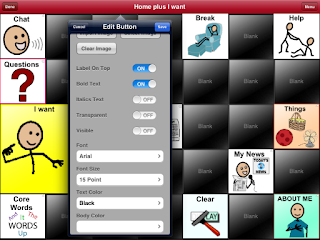

TouchChat HD ($149.99) allows you to create page layouts determined by number of rows and columns. It is possible to "hide" buttons you are not ready to teach by sliding the Visible toggle to OFF in the Edit Button menu. It is also possible to change button background colors in order to further highlight key vocabulary.


TouchChat uses SymbolStix icons (as does ProLoQuo), as well as images saved from the internet or photos taken by the iPad.  Features unique to TouchChat include: a variety of Button Actions (including Navigate, Clear Display, Play Audio), ability to "hide" or turn off Visibile status of buttons or links, ability to vary size and color of buttons, option to create pages with different layouts or number of buttons, iShare service (see below).

Villa Esperanza Services has created custom vocabularies propagated from the pre-programmed, TouchChat vocabularies entitled "MultiChat 15" (in TouchChat HD, $149.99) and "WordPower24" (in TouchChat HD with WordPower, $299.99).  Within each of our customized vocabularies we have selected high priority core words, little words, and actions based on our clinical work with learners, and have made our best attempt to preserve locations of like terms on different pages for consistent motor plans.


Custom Core Words


iShare is a subscription that gives a TouchChat device access to a large server, through the wireless connection on the iPod, iPhone or iPad. You are given access to a private section that only you can access. This is where you can store your personal files. You are also given access to a sharing section of the server. Here, you can post page sets that you want to share with others, and download page sets that others have posted.

iShare is a feature of TouchChat that comes free for 365 (as of 2/6/12, subject to change).  To register and start downloading/uploading, follow the step by step, below.  Six-month subscriptions to iShare are purchased for $59 as an in-App purchase from the TouchChat application. Note: Each device that participates in iShare must have its own iShare subscription and must have connection to a wireless network.

 Go to the upper left of a home screen for any vocabulary and select the Vocab button embedded in the orange heading bar. On the Vocab File page, select Menu in the upper right and choose iShare Service. You will be asked to register and offered 365 days of service free of charge (at least that is the status quo today, 2/6/12). Choose a user name and password that will be exclusive to iShare (not shared with iTunes or any other subscription), and you're on your way!


The iShare folders will appear and you may select to download or upload files to My Files (available only to you, under your user and password), Public Files (for TC HD users, no Word Power files here), or WordPower (for those with the premium version of TC - this folder will not appear if you own the $149 version of the app)


Whatever folder you select, a Categories list will appear. To find Villa Esperanza vocabularies, select All Categories and scroll down near the bottom of the alphabetically organized file list. 


The two customized vocabularies are free on iShare, and have been updated routinely, so that the most current dated version should be downloaded.

VES MC15 2/6/12 
&
VES WP24 2/6/12 (only available to those with WordPower - the $299 version)

Boardmaker Share - February Activities!

These pages are to be added to the book I already shared about Abraham Lincoln. The 1st 4 pages are new. The 5th page ...

These worksheets go with the book Love, Splat by Rob Scotton and used as a literacy activity for elementary students with...

February Words
Circle the words about February. Interactive lesson if you have pro....
What would you see in February? A short activity where students can circle what they could see in Febraury. Geared towards students in the New England R...

February Sorting
The students will drag the pictures that belong in February into the heart....

Frog and Toad are Friends "Spring" Vocabulary - 2

Frog and Toad are Friends "Spring" Vocabulary 1   

Call for Papers - 2012 ASHA Convention


The Call for Papers for the 2012 ASHA Convention in Atlanta, GA (November 15-17, 2012) is now open.  Visit ASHA's 2012 Convention webpage for access to the online Call for Papers and the latest information on the ASHA Convention.  The deadline for proposal submissions to the Call for Papers is Thursday, March 22 (11:59 pm Eastern / 11:59 pm Pacific).

Mark your calendar now for the 2012 ASHA Convention at the Georgia World Congress Center in Atlanta, GA, November 15-17. Be sure to check www.asha.org/asha2012 for updates!
 

FREE CEUs - 2/27/12 - Software for Auditory & Lang Processing

Attend a FREE .1 CEU course tomorrow, February 7, 2012.
Click on the link below between 1:30 p.m. and 2 p.m. EST to attend a .1 CEU course Software for Auditory and Language Processing Disorders, by Beth Holland, M.A., CCC-SLP. Remember, you must have an account on Super Dupers website to access this course.


Beth Holland, M.A., CCC-SLP, received a bachelor’s degree in hearing and speech sciences and a master’s degree in speech-language pathology from the University of Maryland at College Park. Her experience as a speech-language pathologist includes working with students with a variety of disabilities in diverse settings including mainstream classes, full-inclusion programs, and special class placements. She has previous experience as a professional development specialist and director of curriculum in the field of educational publishing. Beth is currently an editor with Super Duper® Publications.

VIDEO: Steve Gleason's Super Bowl Pregame Feature


By: Brian Floyd
I'm not sure how many people knew Steve Gleason's story before Sunday, when NBC aired a lengthy feature on his battle with ALS. The feature itself was difficult to watch, knowing that just a few years ago, Gleason was healthy, youthful and living a happy life. In a way, he's still living that happy life, but the personal tragedy he, his family and his friends have been through has been tough to watch unfold.

Gleason is a shell of his old self, succumbing to ALS as it takes over his body and mind. He was officially diagnosed with ALS just about a year ago, and the disease has moved rapidly. Just a few months ago, I saw Steve in Pullman, when he attended a Washington State football game. Seeing the NBC feature on Sunday, and how his health has rapidly deteriorated, was heartbreaking. (continued)

Friday, February 3, 2012

Visual Strategies Survey Results - Linda Hodgdon

Linda Hodgdon's has complied a summary of thousands of answers from Speech Therapists, educators and parents of individuals with ASD that she tapped into as a Visual Strategies Focus Group. Their experience and expertise are shared via survey results collected over the past year by Ms. Hodgdon. This PDF 'eBook' special report is now available to all. Take a peek...


Many thanks to you, Linda!

View Linda's website,
http://www.UseVisualStrategies.com

Wednesday, February 1, 2012

Minspeak E-Newsletter - 2/1/12

If you're having trouble viewing this email, you may see it online.
Share This:
Send to Friend
February 01, 2012
  • Intervention Planning: All of the intervention plans and teaching materials were highlighted for learning to ask questions, except for “am” questions. Download the “Am” Intervention Plan and 3 simple PDF books: “Am I –I Am?”, “I Am-Are You?” and “Am I – Am I Going?”
  • Teaching Materials Exchange: Valentine's Day is right around the corner. Print out the “Do You Like Me? – Will You Be Mine?” card that encourages your students to ask 2 simple questions. The card is coded with Pixons and icon sequences from Unity®45, Unity®60, Unity®84, and Unity®144.
  • Teaching Tip: Do you need to make a quick and easy communication vest. Simply take a T-shirt, cut off the sleeves and cut open along the side seams. Create a pocket to store materials by flipping up the front of the T-Shirt about 2 or 3 inches and sewing along the outer edges and in the middle. Finish off the raw edges with seam binding. Add 2 or 3 strips of Velcro along the top of the front of the t-shirt. Attach a 3 to 4 inch piece of elastic from the front side to the back side (about 6 inches under your arm). This makes it easy to put on and take off and prevents the front of your communication vest from flapping or rolling up.
  • Pittsburgh Language Seminar Series: Check your calendars to see whether or not you can attend one of the upcoming seminar series. February 14-16 features Katya Hill as the guest speaker, March 13-15 features Jane Odom, April 17-19 features Marilyn Buzolich, and May 22-24 features Gail Van Tatenhove. All of these seminars are provided free of charge, with meals and lodging provided. Contact Renee McGough immediately at 412-885-8541 or email her at rmcgough@minspeak.com to register.
  • Announcements: Gail Van Tatenhove will be presenting a webinar for ATIA entitled “Core Vocabulary: Why Use It?” on Wednesday, February 15, 2012 from 3:30 – 5:00 pm EST. Register with ATIA to attend this webinar. The webinar code is: AT12-WEB04.


Benefits of Minspeak
Using multi-meaning icons.
The power of motor automaticity.


Use of Minspeak
Minspeak systems with different disabilities.
Minspeak and cultural-linguistic diversity.


The Power of Minspeak
Minspeak, language and literacy development.
Using Minspeak in the classroom.


Support of Minspeak
Strategies to support use of Minspeak.
Minspeak teaching materials.


Visit us online www.minspeak.com
© Semantic Compaction Systems 2009
1000 Killarney Drive, Pittsburgh, Pennsylvania 15234, USA.
Tel. 412.885.8541 Fax 412.885.8548
This message was intended for: gmeier@villaesperanzaservices.org
Got this as a forward? Sign up to receive our future emails.
Unsubscribe
Home Contact Us Minspeak What is Minspeak Who Uses Minspeak Why Use Minspeak Demo Minspeak Lives Transformed Through Minspeak