The Southern California Augmentative and Alternative Communication Network...

...is a support group for professional development, problem solving, leadership, mentoring, and training in the use of augmentative and alternative communication (AAC) to develop communication in non-speaking and minimally verbal individuals in the Southern California Region.

Follow this blog via email at the right.
Join our email list: socalaacnetwork@gmail.com
Friend us on Facebook SoCal AAC
Follow us on Twitter @SCAACN

Sunday, February 12, 2012

Saturday, February 11, 2012

Center for AAC & Autism launches in UK

PRESS RELEASE - retrieved from Communication Matters (Posted on 31 Jan 2012)
The Center for AAC & Autism, which was founded in the USA in 2009, is pleased to announce the launch of a UK office dedicated to helping children with autism learn to communicate through the power of Augmentative and Alternative Communication (AAC) communication aids.
"More than half of the thousands of children diagnosed with autism spectrum disorder (ASD) every year are unable to communicate verbally," explains the UK Center's Director, Sara Honey SLT, who has worked extensively with children with autism during more than 9 years as a speech therapist. "Our own experience and published research shows that AAC offers many of these children a viable method of independently and spontaneously expressing themselves."

Focusing attention on the promise of AAC for nonverbal communicators is a key mission of the Center. "A voice output AAC communication aid gives a nonverbal child a way to communicate, which can increase social engagement, decrease frustration and improve behaviour, and help others to see the child's true potential," Sara added.

Staffed by speech and language therapists, occupational therapists and assistive technology experts, the Center offers Language Acquisition through Motor Planning (LAMP) training seminars nationwide to teach professionals and family members AAC strategies for promoting language development for those with autism. The Center also serves as an online destination for AAC information, tools and additional resources; supports clinical research aimed at the effective implementation of AAC within the autism arena; and facilitates sharing of best practices and success stories among therapists and families.

The Center was developed with support from AAC technology leader Liberator Ltd in response to the growing demand for communication solutions for the autism spectrum disorder population and increased interest in LAMP methodologies.

"Supporting the work of the Center for AAC & Autism directly aligns with our mission to enable communication without limitations, through our AAC devices and Unity® language system," says Liberator Ltd Managing Director, Ian Thompson. "For too long, autism has imposed its silence on too many; we're proud to support the Center's efforts, working and learning with therapists and parents to offer real solutions through AAC."

To learn more about the Center for AAC & Autism please go to www.aacandautism.co.uk

PRESS RELEASE

Friday, February 10, 2012

AAC Feature Matching (K. Rausch)

At the ATI Pre-Conference session, February 10, 2012 (Costa Mesa, CA), Kathleen Rausch reviewed AAC assessment as part of this 1-day program Update Your AAC Toolbox: Assessment, Current, Devices, iPad Apps, and More! This presentation will be reprised in April 2012 at Lanterman RC (Click HERE for more info).

Let's take a look at the Feature Matching process...

Matching an individual's needs to specific features of a device or communication system is an essential element in any AAC assessment. Feature-matching refers to the process of matching the skills and communication needs of the AAC user with the features of a given AAC system. This process requires an in-depth exploration of the potential user's current language comprehension, literacy, communication skills, and potential for progress and learning. In addition, knowledge of the various and growing variety of AAC devices on the market is a must.

As a clinician, you can boost your current knowledge of available high tech AAC devices by signing on to AAC Tech Connect to access their Device assistant and Apps assistant resources (free trials available) which compare features and functions for you. The alternative: do the research yourself via personal experience, online resources such as this blog, catalogs, etc. 

Considerations in your AAC process (from Kathleen Rausch):
  • Sensory-motor factors
  • Cognitive Factors
  • Environmental factors
  • Complexity (symbol set, number of messages, language, vocabulary, programming, etc.)
  • Input and output method
  • Family, school staff, vocational support available
  • Client preference and motivation
  • Extra device features
  • Funding source requirements
Purpose of Use (from Kathleen Rausch):
  • Output - variety of available/appropriate and audible voices, languages other than English
  • Speech settings - pausing, speak after word or punctuation
  • Customization of speech settings - rate, pronunciation exceptions
  • Symbol representation - objects, photos, drawings, abstract symbols, multiple meaning symbols, text with pictures, text alone
  • Display settings - single message buttons, text-to-speech option, keyboard, portrait and/or landscape, size of message window
  • Customization of display settings - color coding, font size, shape and size of buttons, keyboard ABC order or QWERTY
  • Feedback features-  visual scanning, highlighted text, animation, auditory clip
  • Rate enhancement features - "recents" for common phrases, within word and between word prediction, phrase prediction
  • Access - direct selection, switch access (more on this to follow...!)
  • Motor competency - touch pressure required (traditional SGDs vs. touchscreen mobile devices) tap, swipe, drag, double tap, dwell
  • Support - technological support, weigh in with feedback for app creators, watch apps in motion via YouTube clips/reviews, availability of a manual
Things to Remember: Feature Matching (from Kathleen Rausch)
    • Every communication system has its strengths and weaknesses
    • Consider future communication needs (potential for 5 years of development)
    • Choosing the "correct" device does not equal successful use of the device
    • Do not focus solely on device features, but take into account all external factors
    • FINALLY - the primary focus of any AAC system should be on languae use and development!

    Support PCDA - Calling Pizza Lovers

    Enjoy pizza and support PCDA!
                                                                                                                                                
    You are invited to join PCDA for a fundraising event at:

    DATE: Wednesday, February 22, 2012
    TIME: Anytime between 11am-10pm; Dine-In or Take-Out
    LOCATION: 99 Los Robles Avenue, Pasadena CA 91104 (on Los Robles between Walnut & Colorado)

    Mark your calendars for Wednesday February 22nd! Support PCDA while enjoying a delicious menu of entrees and drinks... whether you dine-in or take-out, 20% of your bill will automatically come back to PCDA to support programs and services.

    All you need to do: PRINT THIS FLYER and bring with you when ordering to ensure that PCDA receives a credit for your purchase. Dine anytime from 11am to 10pm!

    Please share this event with your friends and family - just click "Forward this email" below to spread the word. 

    For questions, please email Anne Yee.
    Thank you for your participation and support!

    -Everyone at PCDA

    Tuesday, February 7, 2012

    USC Screening (Maceo & iPad) - Feb 23

    USC Annenberg journalism professor Dan Birman and the Impact team invite faculty, staff and students to the FREE spring screening of Annenberg’s award-winning television newsmagazine show. The screening will feature a special Impact documentary (20 min) about Maceo McKay, a two-year old born with a condition that impairs his mobility and communication. 
    There are some stellar people interviewed in the film including Maceo's neurologist Dr. Sanger from CHLA, David Niemeijer the man who created "Proloquo2Go" (which is the communication system that Maceo uses on the iPad) and Cindy Cottier, an augmentative communications specialist and speech-language pathologist, who helped put Maceo and his family on path of communicating with using the iPad. “My Name is Maceo” is produced by undergraduates David McAlpine and Alexandra Cook.

    USC's Annenberg Auditorium
    Thursday, February 23
    6-8 p.m.

    RSVP requested. To RSVP, click here.

    2 Weeks! SCAAC-N Winter Quarterly Meeting with Cynthia Cottier

    Tuesday, February 21, 2012 -  join us in welcoming Cindy Cottier, M.A., M.Ed., C.C.C., at our quarterly Southern California AAC Network Meeting (FREE as always).  If you missed Cindy's presentation at the 2011 American Speech-Language Hearing Association conference in San Diego - you're in luck! We'll meet from 6:30-8:30 p.m. at Villa Esperanza Services in Pasadena, CA, and hear about Cindy's experiences using iPad applications with multiply handicapped individuals. 

    Cynthia, A. Cottier, M.A., M.Ed., CCC, is a Speech-Language Pathologist who has been working in the field of AAC since 1980. She has extensive experience working directly with individuals ranging in age from 2 to 75+ years and of all disabilities. In addition, Ms. Cottier has vast knowledge of a wide variety of state-of-the-art augmentative and assistive systems, techniques and strategies.
    Initially, Ms. Cottier coordinated and developed the Los Angeles Unified School District's Augmentative Communication Program for 7 years; then in 1992 she began her own private practice in Pasadena, CA, that is dedicated to servicing all individuals who use augmentative communication devices and assistive technology systems. She has participated in numerous projects, studies and grants to further professional knowledge and clinical guidelines for augmentative communication service delivery.  Ms. Cotter has given numerous presentations at state and national conferences, as well as conducted various workshops and seminars for training institutes and state universities. 

    Hope to see you then! 

    Monday, February 6, 2012

    TouchChat HD - iShare VES Vocabularies (FREE)

    Hello from Villa Esperanza Services' Speech & Language Center,
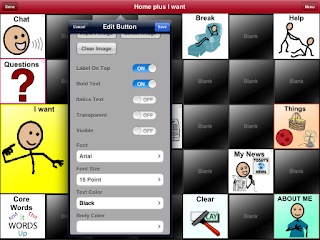
    Our speech pathology team has been working with an excellent full-featured communication app for the iPad called TouchChat HD - AAC from Silver KiteWe. While the app comes with a number of "vocabularies" off the shelf, we have worked for the past few months to customize vocabularies to suit our users, who are primarily youth 5-22 years old who are nonverbal, use direct access and who carry the diagnosis of autism spectrum disorder.  


    TouchChat HD ($149.99) allows you to create page layouts determined by number of rows and columns. It is possible to "hide" buttons you are not ready to teach by sliding the Visible toggle to OFF in the Edit Button menu. It is also possible to change button background colors in order to further highlight key vocabulary.


    TouchChat uses SymbolStix icons (as does ProLoQuo), as well as images saved from the internet or photos taken by the iPad.  Features unique to TouchChat include: a variety of Button Actions (including Navigate, Clear Display, Play Audio), ability to "hide" or turn off Visibile status of buttons or links, ability to vary size and color of buttons, option to create pages with different layouts or number of buttons, iShare service (see below).

    Villa Esperanza Services has created custom vocabularies propagated from the pre-programmed, TouchChat vocabularies entitled "MultiChat 15" (in TouchChat HD, $149.99) and "WordPower24" (in TouchChat HD with WordPower, $299.99).  Within each of our customized vocabularies we have selected high priority core words, little words, and actions based on our clinical work with learners, and have made our best attempt to preserve locations of like terms on different pages for consistent motor plans.


    Custom Core Words


    iShare is a subscription that gives a TouchChat device access to a large server, through the wireless connection on the iPod, iPhone or iPad. You are given access to a private section that only you can access. This is where you can store your personal files. You are also given access to a sharing section of the server. Here, you can post page sets that you want to share with others, and download page sets that others have posted.

    iShare is a feature of TouchChat that comes free for 365 (as of 2/6/12, subject to change).  To register and start downloading/uploading, follow the step by step, below.  Six-month subscriptions to iShare are purchased for $59 as an in-App purchase from the TouchChat application. Note: Each device that participates in iShare must have its own iShare subscription and must have connection to a wireless network.

     Go to the upper left of a home screen for any vocabulary and select the Vocab button embedded in the orange heading bar. On the Vocab File page, select Menu in the upper right and choose iShare Service. You will be asked to register and offered 365 days of service free of charge (at least that is the status quo today, 2/6/12). Choose a user name and password that will be exclusive to iShare (not shared with iTunes or any other subscription), and you're on your way!


    The iShare folders will appear and you may select to download or upload files to My Files (available only to you, under your user and password), Public Files (for TC HD users, no Word Power files here), or WordPower (for those with the premium version of TC - this folder will not appear if you own the $149 version of the app)


    Whatever folder you select, a Categories list will appear. To find Villa Esperanza vocabularies, select All Categories and scroll down near the bottom of the alphabetically organized file list. 


    The two customized vocabularies are free on iShare, and have been updated routinely, so that the most current dated version should be downloaded.

    VES MC15 2/6/12 
    &
    VES WP24 2/6/12 (only available to those with WordPower - the $299 version)