The Southern California Augmentative and Alternative Communication Network...

...is a support group for professional development, problem solving, leadership, mentoring, and training in the use of augmentative and alternative communication (AAC) to develop communication in non-speaking and minimally verbal individuals in the Southern California Region.

Follow this blog via email at the right.
Join our email list: socalaacnetwork@gmail.com
Friend us on Facebook SoCal AAC
Follow us on Twitter @SCAACN

Friday, March 9, 2012

TASK Workshops - "APPsolutely Amazing..."

Team of Advocates for Special Kids (TASK) presents
"APPsolutely Amazing: IDevices and Apps for Kids with Special Needs" 

Four dates, three locations - Register TODAY!
Cost :  Free for parents of children with special needs. 
$25.00 for all other attendees. 

Workshop Description:  In this workshop, we will introduce the iPad and iPod Touch. Learn about the built-in accessibility features on these devices as well as some interesting hardware you can buy to go with them. Experience the wonderful applications that can be used on these devices for children with special needs. Some of the applications discussed and demonstrated will include early learning, social skills, life skills, interactive books, communication applications and much more! Join us for a fun, fast paced workshop. (Prior technology knowledge is recommended.)

Please note:This workshop is intended for adults only.
**NO CHILDREN PLEASE**

Date :        Wednesday, March 21, 2012
Time :        9:30 am - 12:30 pm
Location:   Center for Healthy Communities @ The California Endowment (Mojave Room)
                 1000 North Alameda Street, Los Angeles, CA 90012 
You must be preregistered for this workshop. Call 714-533-8275 to register.   
---------------------------------------------------
Date :        Wednesday, April 18, 2012
Time :        9:30 am - 12:30 pm
Location:   Family Resource Library (at East Los Angeles Regional Center)
                 1000 South Fremont Avenue, Alhambra, CA 91803
You must be preregistered for this workshop. Call Michelle Sepulveda @ 626-300-9171 to register. 
---------------------------------------------------
Dates :      Tuesday, May 22, 2012 -or- Tuesday, June 5, 2012  (CHOOSE ONE) 
Time :        9:30 am - 12:30 pm
Location:   Parents’ Place
                 1500 S. Hyacinth Ave., Ste. B,  West Covina, CA 91791 
You must be preregistered for this workshop. Workshop limited to first 50 people who register. NO WALK INS WILL BE ACCEPTED. Call Parents’ Place at (626) 919-1091 to register.

Thursday, March 8, 2012

CSHA District 7 - What's in your Apps! (4/17/12)

The California Speech-Language Hearing Association local district 7 will host an evening presentation on Apps! Patricia Seymour (CSUN) and Catherin Jackson (CSUN) explore the inclusion of tablets into clinical and research settings. (View the official flyer HERE)
  • Advantages and applications in diagnostic and treatment settings
  • Challenges in implementation with clients based on age and severity of needs
  • Evidence-based information that supports clinical use of tablets
When:          Tuesday, April 17, 2012
                     5:30-9:00 p.m.
Where:         Glendale Adventist Hospital
                    1509 Wilson Terrace, Glendale, CA, 91206

Light dinner will be provided.

Wednesday, March 7, 2012

Apple iPad 3 Introduced Today

The new iPad 3 launch kicked off at 10am PT/6pm GMT on Wednesday March 7.
  • "iPad HD" - Improved screen definition, better resolution than some HD TVs
  • Wi-Fi only ($499) and 4G versions available ($649)
  • Verizon and AT&T 4G Network capability (in USA)
    • Hot Spot for other wireless devices (e.g., your laptop)
  • A touch thicker than the iPad 2
  • Available March 16; pre-order today!

Tuesday, March 6, 2012

Mark Your Summer Calendars - ISAAC is stateside this year!

The 15th Biennial Conference of ISAAC will be held from July 28 to August 4, 2012, in Pittsburgh, PA, USA, at the David L. Lawrence Convention Center.
  
The International Society for Augmentative and Alternative Communication (ISAAC) works to improve the lives of children and adults who use AAC. ISAAC’s vision is that AAC will be recognized, valued and used throughout the world. ISAAC’s mission is to promote the best possible communication for people with complex communication needs.

Boardmaker Share - New this March!


Login or sign up to Boardmaker Share for free visuals (Boardmaker CD required) for use in communication, literacy activities, behavior management, and more!  Here are some highlights for March:

Lorax - Students find identical items by turning over cards in a grid, two at a time....
If You Give A Mouse A Cookie - flashcards for sequencing...
Hungry Caterpillar Inference Activity - Students guess what fruit or vegetable their caterpillar ate by listening to a few or all 4 clues...
Token punchboardPBS token board. Used in class for their structured work activities. Some students earn stars, some students use a hole ...  
I can upset when a friend will not play with me.A social Skills story for a K-student...
Worktime behaviors: I will and I will notA chart showing desired and undesired behaviors....
 

SCAAC-N Winter Meeting Notes - 2/21/12

Our SCAAC-N Winter Quarterly meeting at Villa Esperanza Services was a great success!  Cindy Cottier presented expertly to an audience of 22 students, clinical fellows, SLPAs, SLPs, AAC specialists, a parent advocate, a special ed lawyer, and device reps.  "Using AAC iPad Applications with Children with Multiple Disabilities" introduced some excellent apps and customizations we can't wait to share...

Cindy's benefits of the iPad versus traditional speech generating communication devices:
- larger display allows for easier access
- customization quick and easy
- lightweight and portable
- affordable
- appears age appropriate
- easy to support (every assistant/instructional aide knows how to use iDevices, SmartPhones, etc. so that the overwhelm-factor that so often accompanies communication devices is minimized in the case of the iPad)

The "get ready to talk" cue:
Cindy encourages clients to leave their message in the display or window after message construction and DIScourages the go-home-and-clear impulse that many clients seem to adopt.  Leaving the message in the display allows time for discussion, correction, re-statement as needed. (from my personal experience) Many students with autism get in the habit of clearing immediately after 'speaking,' allowing for little discussion particularly with iPad apps (ProLoQuo and TouchChat) that do not have an easy Go Back or Undo function (alternatively, Dynavox does).  Instead, she teaches "get ready to talk" as the prompt to go-home-and-clear your display in preparation for the next phrase.
Great idea!

Sounding Board app by AbleNet. Quick and easy to program, switch accessible (1 and 2 switches), iPhone and iPad versions, from 1-9 symbol/button locations per page, start with one screen then grows into linking, $49.99.


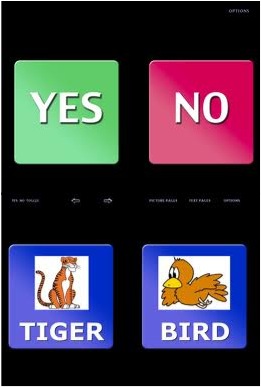
Answers:YesNo ($1.99) and Answers:YesNo HD ($3.99) apps 
HD Version Features:
- Large buttons with ample selectable borders to assist with activation
- 5 Yes-No voices: man, woman, cartoon, boy, and girl
- The ability to program custom buttons with user defined color, text, audio (record your own), and pictures
- The ability to pre-program 5 lesson plans, each consisting of 6 pages of custom button pairs
- Enhanced navigation options
- Visual cue of selected buttons for the hearing impaired
- Multi-language support


Some accessory highlights:
- Cindy's home-made key guard (above) for simple apps such as Answers:YesNo.  Made from a case similar to a Belkin Snap Shield - Back cover in Smoke color (left).  Dremmel drill was used to cut out the message areas and the control holes (for use with a stylus). A Velcro strap was used to keep the key guard attached to the device (for grabby fingers and reflexes). Amazing!


- AbleNet table top suction cup mount. Slide the iPad out of it's case and into this adjustable angle mount for smooth topped tables (textured tops will not provide adequate suction adherence)


- InCase convertible book jacket modified (in your garage) with two grommets, two rings, and a shoulder strap for portability and use on the go.
While it's built-in standing capability is poor, the velcro piece that keeps the device in, and the external elastic strap provide extra protection in use and transit. 


Final thoughts on the iPad revolution in the field of AAC:
- Advantages include a crisp, bright display that is engaging to MANY learners
- Sometimes, the iPad is the ONLY thing that works!

Cindy cautions that the iPad is not for everyone! She cautions:
1) An evaluation is still required in order to match the user's needs to the hardware/device and the software/application, based on feature matching.
2) An SLP should be involved in decision-making regarding vocabulary selection, language development, and prompting/teaching strategies
3) A trial period is a must to be sure that any device and software fit is a good one!
Cindy's original PowerPoint presentation is available from ASHA (on their 2011 conference website, HERE)

Many thanks to Cindy, and to all of our Network participants. Stay tuned for news of our Spring Quarterly Meeting (FREE; tentative date, Tuesday, 4/17/12).


AAC Language Lab Webinar (PRC) Wed, 3/14/12, 1-2:00 EDT


AAC Language Lab Webinar Wednesday, March 14, 2012
1:00pm - 2:00pm EDT

Take a tour of PRC's AAC Language Lab.  In this tour you will find...
• Descriptions of Six Language Development Stages
• Sets of Lesson Plans for Teaching Language
• Unity® Curriculum
• Lessons to Use with IntelliTools Classroom Suite
• Smart Charts with Icon Sequences for Unity
• PowerPoint Slide Shows for Teaching Language Concepts
• Goals and Objectives for Language Development
Click here to reserve your FREE Webinar seat!  

After registering you will receive a confirmation email containing information about joining the Webinar.
System Requirements
Pc-based attendeesMacintosh®-based attendees
Required:  Windows® 7, Vista, XP or 2003 ServerRequired:  Mac OS® X 10.5 or newer